How to Manage Salon Staff Schedules Without Double Bookings or Clashes
Running a salon or barbershop with a team? Learn how to manage staff schedules, time off and bookings in one shared calendar, and stop double bookings.
When you work alone, your schedule is simple. You know when you are free, you know when you are busy, and you know when you need a day off. Once you hire your first stylist, barber, nail technician or therapist, that simplicity disappears almost overnight.
Suddenly you are keeping track of more than your own day. You need to know who is working on Tuesday, who does knotless braids and who only does cornrows, who asked for Friday off, and whether the 2pm slot a customer wants is free with the person they actually asked for. Most growing businesses try to manage all of this with a notebook, a group chat and a lot of memory. It works for a while, until two customers arrive for the same chair at the same time.
This guide covers the most common scheduling problems in salons, barbershops, spas and studios, the habits that keep a team calendar running smoothly, and how Converbold gives your whole team one calendar to work from.
Why Team Scheduling Gets Messy So Quickly
Adding one person to your business does not double the scheduling work. It multiplies it. Every staff member brings their own hours, their own services, their own days off and their own customers. Every booking now needs an extra question: with whom?
Here are the problems most owners run into first.
Bookings live in too many places
The owner takes some bookings on WhatsApp. A stylist takes others on her personal Instagram. The receptionist writes walk-ins in a notebook. Nobody has the full picture, so nobody can say with confidence whether a slot is really free.
Double bookings
When there is no single calendar, two people can promise the same slot to two different customers. The result is an awkward conversation at the front desk and a customer who leaves unhappy, often for good.
Time off that nobody remembers
A barber mentions on Monday that he will be away on Saturday. By Thursday, someone has booked three customers with him for that day. Now you are calling customers to move their appointments, or scrambling to cover his chair.
Uneven workloads
Without a clear view of the week, one stylist ends up fully booked while another sits idle. The busy one burns out, the quiet one feels left out, and customers wait longer than they should.
Staff constantly asking the owner
"Who do I have tomorrow?" "Did anyone book me for the afternoon?" "Can I take Friday off?" When the schedule lives in the owner's head or phone, every staff member has to ask, and the owner becomes the bottleneck for everything.
What Good Team Scheduling Looks Like
Before choosing any tool, it helps to know what you are aiming for. A well-run team schedule has a few clear qualities:
- One source of truth. Every booking, whether online, by phone, on WhatsApp or as a walk-in, goes into the same calendar.
- Each person has their own column. You can see at a glance who is doing what, and when.
- Hours and time off are built in. Nobody can be booked when they are not working.
- Customers can choose who they want. Regulars can book their favourite stylist directly, and new customers can take whoever is free.
- Staff can see their own day without asking. The owner is no longer the only person who knows the schedule.
- The owner keeps control of the money. Staff can manage bookings without seeing payouts or billing.
That is exactly what a shared booking calendar is designed to do.
How Converbold Gives Your Team One Calendar
Converbold is an online booking platform for salons, barbershops, spas, clinics, studios and other businesses that run on appointments. One of its core ideas is simple: the whole team works from one calendar.
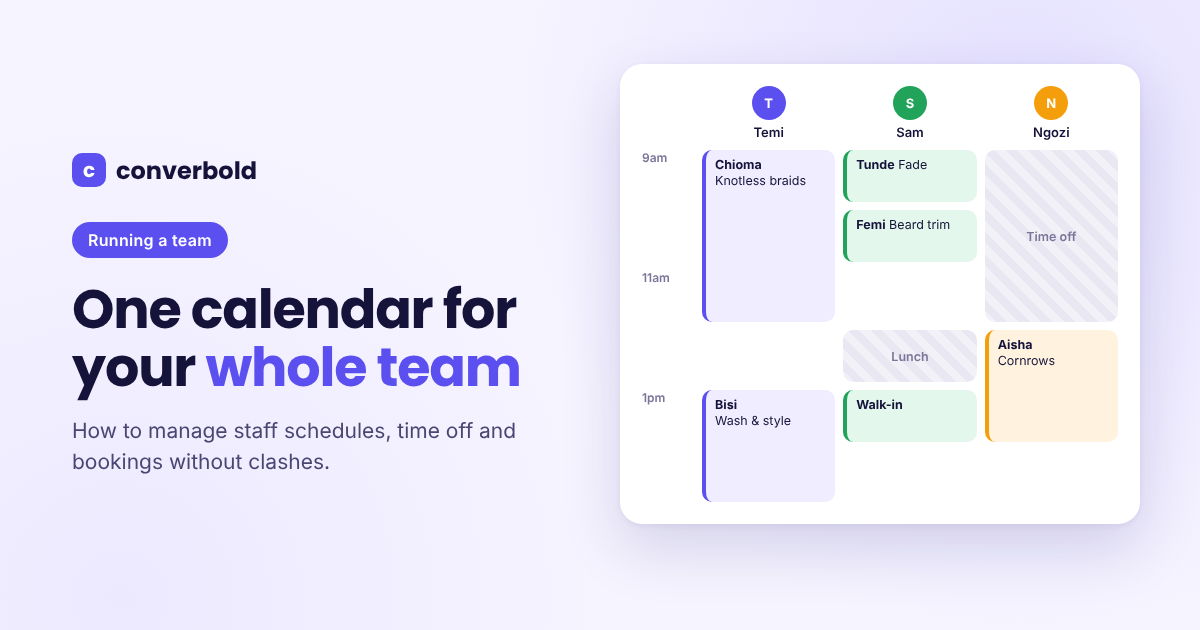
A column for every person
In the Converbold calendar, everyone who takes appointments gets their own column. You can view the day by person, the week at a glance or the whole month. Closed hours, breaks and time off are shaded, so nobody accidentally books into them.
When a walk-in arrives or someone calls, you click an empty slot in the right person's column and add the booking. It sits alongside every online booking, so there is never a question of whether a slot is taken.
Each person has their own services, hours and time off
Not every stylist offers every service. In Converbold, each staff member has their own photo, the services they offer, their working hours and their time off. If Sam only does fades and beard trims, customers will only be able to book those services with Sam. If Ngozi works Tuesday to Saturday, nobody can book her on a Monday.
When someone needs a day off, it goes into the calendar once and that time is blocked automatically. Customers simply will not see those slots on your booking page.
Customers choose who they want, or "anyone available"
On your Converbold booking page, customers can choose a specific staff member or pick "anyone available". Regulars who always sit in the same chair can book that person directly. New customers who just want the earliest slot can choose "anyone available" and see the most open times across the whole team.
This spreads bookings more evenly. Quieter team members pick up new customers, and busy team members are not overloaded with people who would have been happy with anyone.
Rescheduling without the chaos
Plans change. When an appointment needs to move, you can reschedule it in a few taps in Converbold, and the customer gets the new time by email. No more long message threads trying to agree on a new slot.
Giving Staff the Right Level of Access
One of the biggest worries owners have about a shared system is privacy. You want staff to see their bookings, but you do not necessarily want everyone seeing payouts and billing. Converbold handles this with clear roles:
- Owner: has access to everything, including billing, payouts and exporting data.
- Manager: runs the day, with access to bookings, services, staff, hours and customers.
- Staff: sees their own calendar and bookings, marks appointments as done and manages their own time off.
- No login: the person can still be booked on your page, but you manage their schedule for them.
That last option is useful for team members who are not comfortable with apps, or who work part-time. They still appear on your booking page and customers can still book them, but they never need to open the dashboard.
Security is also handled properly. Converbold supports two-factor sign-in, lets you see every device signed in to your account, and when you remove a team member they are signed out everywhere at once.
Setting Hours and Rules That Protect Your Team
A good schedule protects your staff as much as it serves your customers. Converbold lets you set rules once and applies them to every booking automatically.
Opening hours and breaks. Set different hours for each day of the week, with lunch breaks that nobody can book over. Your team actually gets to eat.
Cleanup time. Add buffer minutes after a service so staff are not rushed from one customer straight into the next. This matters for services like colour, facials and nails, where the station needs resetting.
Minimum notice. Stop surprise bookings that land ten minutes before a slot. You can require anywhere from one hour to two days of notice.
How far ahead. Decide whether customers can book one week out or up to a year ahead. A shorter window keeps your schedule flexible, while a longer one suits services like bridal makeup that are planned months in advance.
Public holidays and closures. Add your country's public holidays in one tap, plus any days the business is closed.
Pause bookings. If the whole team is taking a break, you can switch off new bookings without losing anything already in the calendar.
Daily Habits That Keep a Team Calendar Accurate
A tool only works if the team uses it consistently. These simple habits make a big difference.
Put every booking in the calendar, no exceptions
If a customer books on WhatsApp, add it. If someone walks in, add it. If a regular calls, add it. The calendar is only reliable when it holds everything. The moment bookings start living elsewhere again, double bookings come back.
Mark appointments completed or no-show
At the end of each appointment, mark it as completed or no-show in Converbold, and record what was paid at the visit. This keeps your records accurate and builds a real picture of how each customer and each staff member is performing.
Let staff manage their own time off
Instead of telling the owner and hoping it gets remembered, staff with a login can add their own time off in Converbold. It blocks their calendar immediately, so customers cannot book them for those days.
Check the week ahead every Monday
Spend five minutes at the start of each week looking at the week view. You will spot gaps, busy days and uneven workloads early enough to do something about them, such as moving a staff member's day off or promoting a quiet day on your WhatsApp status.
Use reports to plan staffing
Converbold reports show revenue, bookings, new customers and your no-show rate for any period, compared with the one before. Over time, they show which days and periods are busiest, so you can decide when you need more people in the shop and when you can afford to give someone a day off.
When Your Team Is Ready to Grow
Converbold is free to start, with a Free plan for one person and up to 50 bookings a month. Once you add staff, the plans grow with you:
- Starter covers up to 5 staff and 300 bookings a month, with online deposits, WhatsApp and SMS reminders, no-show protection, standard reports and custom branding.
- Pro gives you unlimited staff and unlimited bookings, plus advanced reports and exports, the option to remove Converbold branding and priority WhatsApp support.
Prices are set for your region and billed in your local currency, and yearly plans come with two months free. You can compare everything on the Converbold pricing page.
How to Set Up Your Team on Converbold
Getting your whole team onto one calendar takes very little time:
- Create your free account at converbold.com. No card is needed to start.
- Add your services, with prices and how long each one takes.
- Add your team members, with their photo, the services they offer and their working hours.
- Decide who gets a login and choose the right role for each person.
- Set your business hours, breaks, cleanup time and holidays.
- Add any bookings you already have so the calendar starts complete.
- Share your booking link so customers can book the person they want.
A growing team should not mean a growing headache. When every booking, every shift and every day off lives in one calendar, double bookings stop, staff know their day without asking and you get back to running the business instead of policing the schedule. Start your free Converbold account and give your whole team one calendar to work from.
Written by
Converbold
We build Converbold for businesses that run on appointments. Questions or ideas for a guide? Tell us.